January 06, 2026 | 5 min read
Overview of Abstract Management
This guide offers an overview of the Eventact abstract management system, outlining the workflow from the initial call for abstracts to review, decision-making, agenda creation, and digital display.
For information on review workflows, agenda planning, and publishing, please refer to the corresponding guides.
- Call for Abstracts and Submission |
- Review Process and Evaluation |
- Results Aggregation and Decision Making |
- Agenda Building |
- Poster and E-Poster Management |
- Speaker and Chairperson Notifications
1. System Overview and User Roles
The system is flexible and allows organizers to tailor processes and settings to the specific needs of their event.
- Event Organizer - The administrator responsible for managing the system, including defining the abstract structure, topics, deadlines, and review process rules.
- Abstract Submitter - The participant who submits a proposal or paper for consideration.
- Reviewer - An expert assigned to evaluate submissions by providing scores or written feedback according to the criteria set by the organizer.
2. Call for Abstracts and Submission
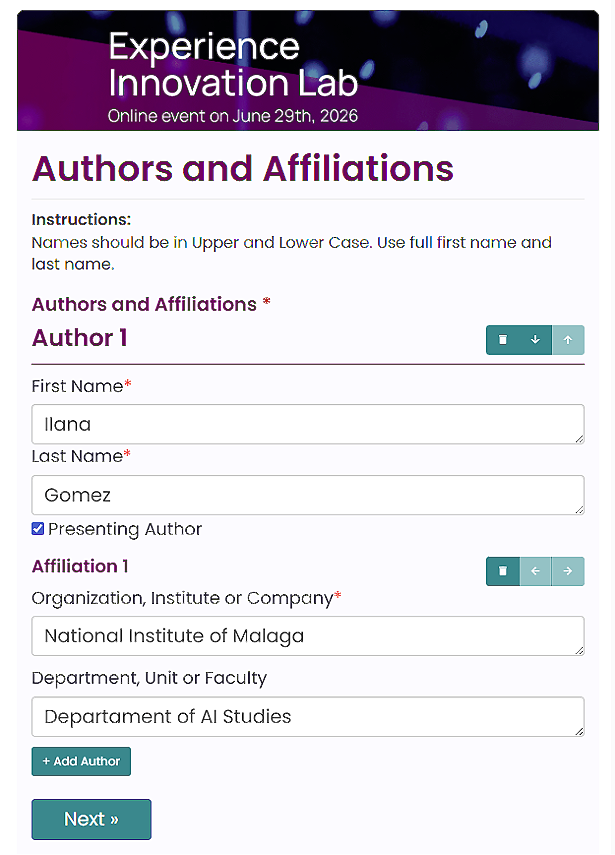
The submission phase is managed through an online form. Organizers use the Eventact form builder to create an abstract submission form tailored to the event. See the abstract submission demo for an example of the submitter experience.
The Submission Form
The form includes predefined, customizable fields for abstract management. Organizers determine which fields are required or optional. Key fields include:
- Authors and Affiliations - Capture the primary author, co-authors, and their associated organizations.
- Abstract Body - The main text of the submission.
- Topic Selection - Submitters select a topic and subtopic to ensure abstracts are routed to the appropriate reviewers.
- Presentation Type - Select a format such as oral, poster, e-poster, or other custom types defined for the event.
- Custom Fields - Additional fields required for the specific event.
For a detailed guide, see: Setting Up an Abstract Submission Form in Eventact.
3. Review Process and Evaluation
Eventact supports two types of abstract review:
- Individual Review - Reviewers independently score each abstract using numeric ratings, criteria-based evaluations, and written comments. They access a dedicated reviewer portal.
- Competitive Ranking - Reviewers rank a set of abstracts from best to worst without scoring each individually. This format is available in the Eventact Event App through the Rank Voting feature.
Both review types use self-contained review cycles, each with distinct settings, reviewers, and assigned abstracts. Multiple cycles may run simultaneously.
For more detailed instructions, see: Abstract Review Cycles: Individual Review and Competitive Ranking.
4. Results Aggregation and Decision Making
After the review phase, the system compiles all reviewer data to support final decisions by the chairperson, committee, or organizer.
- Data View - View all abstracts with their average scores and reviewer comments (Individual Review), or a combined ranking leaderboard (Competitive Ranking).
- Final Decisions - Based on the results, each abstract receives a final status: Approved, Rejected, or Change of Presentation Type.
5. Agenda Building
After abstracts are reviewed and decisions are finalized, Eventact provides tools to build and publish the event agenda.
Agenda Creation

- Hierarchical Structure - Create sessions and individual lectures within those sessions.
- Complex Scheduling - Supports multi-day events and multiple lecture halls operating at the same time.
- Abstract Integration - Import approved abstracts and speaker profiles directly into the schedule.
- Sponsor Support - Add and manage sponsor logos within the agenda.
Display Features
The published agenda is interactive and designed to engage attendees:
- Personal Agenda - Attendees can select specific sessions to build their own schedule.
- Expandable Sessions - Expand any session to view complete lecture abstracts, speaker details, and additional information.
- Search and Filter - Find content by lecture details, topic, or hall.
- On-site Display - Hall-specific screens in each room automatically show the current and next lecture based on the schedule.
6. Poster and E-Poster Management
Approved posters follow a dedicated process for digital upload and display.
Approval and Upload
When a poster abstract is approved, the system automatically grants the submitter permission to upload the e-poster. The submitter receives a secure private link and must log in to upload their file (PDF, image, or similar format).
Display Options
E-posters can be displayed on multiple platforms:
- On-site E-Poster Viewer - A dedicated interface for attendees at the venue.
- Event Website - E-posters integrated directly into the event website.
- Event App - Attendees can browse all e-posters through the Eventact Event App.
7. Speaker and Chairperson Notifications
Event organizers can use the Eventact Message Editor to create email templates with dynamic data tokens. The system automatically inserts personalized participant information into each message, whether sent individually or in bulk.
Eventact offers two data tokens that generate dynamic, recipient-specific summaries for speakers and chairpersons:
-
{Participant.SpeakerLecturesDetails}
For speakers, this token summarizes all lectures they are presenting. Each entry includes the lecture title, start and end times, session details with chairpersons, and the assigned hall. -
{Participant.ChairSessionsDetails}
For chairpersons, this token summarizes all sessions they are chairing. Each entry includes the session title, start and end times, and a list of lectures with titles and links to abstracts. If a lecture has a presenting author, their name, role, affiliation, email, and phone number are included.
Example Email
Subject: Important: Your Presentation Schedule and Session Details
Dear {Contact.FullName},
Thank you for confirming your participation as a speaker at our upcoming event.
Below is your finalized schedule, including room assignments and chairperson details for your lectures. This information is generated directly from the event agenda:
{Participant.SpeakerLecturesDetails}
Important Speaker Reminders:
- Please arrive at your assigned hall at least 10 minutes before your session to meet the chairpersons.
- Ensure your presentation materials are uploaded and tested at the technical desk before your scheduled session.
If any schedule or session details above are incorrect, please reply to this email immediately.
Best regards,
The Event Organizing Team
Summary
Eventact's abstract management covers the entire submission lifecycle, from a configurable call for abstracts and structured submission forms to reviewer assignment, evaluation, data-driven decisions, agenda creation, and automated speaker and chairperson notifications. Built-in tools for scheduling, digital agenda publishing, e-poster management across on-site, web, and mobile platforms, and dynamic email token generation offer organizers a comprehensive, flexible solution while ensuring a seamless experience for submitters, reviewers, speakers, and attendees.
Have a question or need help configuring your event? Reach out via our support page - we're happy to help.
Read more
Abstract Review Setup
Review Cycles: Individual Review and Competitive Ranking Abstracts & Program | 5 min read